
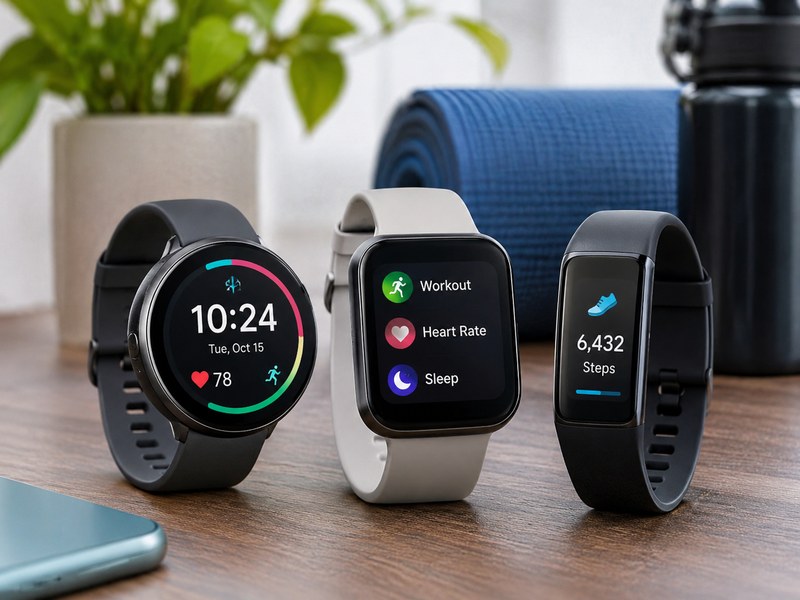
Pick a smartwatch if you want notifications, apps, calls, payments and rich health features on your wrist, and pick a fitness tracker if you mainly want activity, sleep and heart-rate tracking with longer battery life and a lower price. Whichever you choose, check three things first: that it works with your phone (iPhone or Android), that its battery lasts as long as you need, and that the health and sports features you want are actually included. Prices range from very affordable bands to premium watches, so set a budget before you compare models.
Smartwatch vs Fitness Tracker at a Glance
| Feature | Smartwatch | Fitness tracker |
|---|---|---|
| Main purpose | Phone companion plus health and fitness | Activity, sleep and health tracking |
| Display | Larger, bright, full-color touchscreen | Smaller, often a band-style screen |
| Apps | Yes, with an app store on most models | Limited or none |
| Calls and replies | Often supported, some with LTE | Usually notifications only |
| Payments | Often built in (NFC) | Sometimes |
| GPS | Usually built in | Built in on some models, otherwise uses the phone |
| Battery life | About 1 to 3 days on many models, longer on some | Often 5 to 14 days or more |
| Price | Mid to premium | Budget to mid |
| Best for | People who want a phone on the wrist and advanced features | People who want simple tracking and long battery life |
The figures above are typical ranges and vary by model and usage.
First, Decide What You Need It For
The best choice depends on how you plan to use it.
- Everyday smart features: notifications, calls, payments, music control and voice assistant. A smartwatch is the better fit.
- Basic fitness and sleep tracking on a budget: a fitness band is usually enough.
- Running, cycling and outdoor sports: look for built-in GPS, accurate heart-rate tracking and training metrics.
- Health monitoring: look for heart-rate, blood-oxygen, sleep and, on some models, ECG and temperature sensing.
- Long trips and hiking: prioritize battery life, durability and offline maps.
- Kids and older adults: look for simple use, safety features such as fall detection and location sharing, and easy charging.
Key Features to Look For
1. Phone Compatibility
This is the first thing to check. Apple Watch works only with iPhone. Many Android smartwatches, such as Samsung Galaxy Watch (with Samsung phones for the full feature set), Google Pixel Watch (best with Pixel and other Android phones) and others, work with Android phones. Some brands, including Garmin, Fitbit-style trackers, Amazfit, Huawei and Xiaomi bands, work with both iPhone and Android through their own apps, although a few features may differ. Always check the supported phone models and operating system versions on the manufacturer’s website.
2. Battery Life
Battery life is one of the biggest differences between products.
- Full-featured smartwatches typically last about 1 to 3 days, depending on screen and features.
- Hybrid and sport-focused watches can last one to several weeks in battery-saver modes.
- Fitness bands often last 5 to 14 days or more.
Check how long the battery lasts with GPS on and with the always-on display, since these reduce battery life a lot. Also check charging time and the charger type.
3. Health and Fitness Sensors
- Heart-rate monitoring: standard on almost all devices. Look for continuous tracking and high or low heart-rate alerts.
- Blood oxygen (SpO2): available on many models and useful for trends, but not a medical-grade measurement on most devices.
- ECG and irregular rhythm notifications: available on some models, depending on country approvals.
- Sleep tracking: measures sleep time and stages, with some offering sleep scores and recommendations.
- Skin temperature, stress and recovery metrics: available on many newer models.
- Women’s health tracking: cycle tracking is available on many platforms.
- Step, calorie and activity tracking: basic on all models.
Wearables are useful for tracking trends and building habits, but they are not diagnostic tools. Talk to a doctor about health concerns, and do not rely on a watch alone for medical decisions.
4. GPS and Sports Features
Built-in GPS lets you track runs, rides and hikes without carrying your phone. For serious training, look for multi-band GPS (for better accuracy in cities and forests), training load and recovery metrics, running power, VO2 max estimates, interval workouts, swim tracking with water resistance, and support for sensors such as chest straps. Outdoor and adventure watches add altimeter, barometer, compass, offline maps and rugged build.
5. Display and Design
- AMOLED or OLED screens are bright and colorful and easy to read, but use more battery than simpler displays.
- Transflective or memory-in-pixel displays, common on some sports watches, are easier to read in sunlight and use less power.
- Always-on display is convenient but reduces battery life.
- Size and weight: choose a case size that fits your wrist comfortably, especially for sleep tracking.
- Materials and straps: aluminum, stainless steel and titanium cases, and replaceable straps, affect comfort, durability and price.
6. Water and Dust Resistance
Check the rating. A 5 ATM or 50-meter rating is usually fine for swimming in a pool. An IP68 rating protects against dust and water splashes, but it does not mean the watch is made for diving. Check the manufacturer’s guidance for swimming, saunas and hot showers.
7. Smart Features and Apps
- Notifications, calls and message replies
- Contactless payments (check which banks and countries are supported)
- Music, podcasts and offline storage
- Voice assistants (Siri, Google Assistant or Bixby, depending on the watch)
- Maps and navigation
- Third-party apps and watch faces
- Phone finder, camera remote and smart home controls
Cellular (LTE) versions let you make calls and use data without your phone nearby, but they need a compatible carrier plan and add a monthly cost.
8. Software Updates and Ecosystem
Look at how long the brand supports the watch with updates, how often the apps improve, and whether you can export your data. Platforms such as Apple Health, Google Health Connect and Garmin Connect each have different strengths, so check that the watch syncs with the apps you already use.
9. Subscriptions and Hidden Costs
Some brands lock advanced insights, coaching or workout libraries behind a subscription. Check what works without paying, whether a charger is included, the cost of replacement straps and batteries, and what an LTE plan adds each month.
10. Privacy and Data
A smartwatch collects sensitive health and location data. Check what data the brand collects, where it is stored, whether it is shared with third parties, and which privacy controls you have. Read the privacy policy before you sign up.
Types of Smartwatches and Trackers
| Type | Best for | What to expect |
|---|---|---|
| Apple Watch | iPhone users | Strong apps, health features and ecosystem integration |
| Samsung Galaxy Watch | Samsung and Android users | Wear OS, health tracking and Galaxy integration |
| Google Pixel Watch | Android and Pixel users | Wear OS with Google services and Fitbit-based health features |
| Garmin | Runners, cyclists, outdoor athletes | Excellent battery life, GPS and training tools |
| Amazfit, Huawei, Xiaomi | Budget and value buyers | Long battery life and many features at lower prices |
| Fitness bands | Simple tracking | Light, comfortable, long battery life, low price |
| Rugged outdoor watches | Hiking and adventure | Durable build, maps and sensors |
| Kids’ watches | Children | Location sharing, calling and safety features |
Model lineups change every year, so check the latest reviews for current models in each category.
How Much Should You Spend?
| Budget | What you get |
|---|---|
| Entry-level | Basic fitness bands and simple smartwatches with step, heart-rate and sleep tracking |
| Mid-range | Better screens, built-in GPS, more sensors and sports modes, and longer support |
| Premium | Top displays, advanced health and training features, stronger materials and the best software |
Prices differ by country, so compare current prices across stores, and look for sales during festive seasons and new-model launches.
Smartwatches and Fitness Trackers in India: What to Check
India has a large and competitive market for wearables, with options from global brands such as Apple, Samsung and Garmin, and from brands such as Noise, boAt, Fire-Boltt, Amazfit and Xiaomi, which are popular at lower prices. When you shop, check that the watch works with your phone’s operating system and app, confirm that the seller is authorized and that you receive a GST invoice and warranty, and be careful with very cheap watches that make large health claims, since sensor accuracy varies a lot. Also check that features such as UPI or contactless payments, Bluetooth calling, and local-language or regional app support meet your needs, and confirm the service center network in your city.
Smartwatch Buying Checklist
- Confirm that the watch works with your phone.
- Set a budget, including accessories and any subscription.
- Decide your top three features, such as battery, GPS, health sensors or apps.
- Check real battery life in independent reviews.
- Check sensor accuracy and read reviews from people with similar use.
- Try it on or check the case size and strap options.
- Check water resistance for your activities.
- Check the warranty, return policy and service support.
- Read the privacy policy and check data export options.
- Compare prices across stores before you buy.
Common Mistakes to Avoid
- Buying a watch that does not fully work with your phone
- Choosing only on looks or megapixel-style spec numbers without checking battery and sensors
- Treating health readings as medical advice
- Ignoring subscription costs
- Buying a very cheap watch with unrealistic health claims
- Skipping the return policy and warranty
- Getting a case size that is too big or too heavy for sleep tracking
Tips to Get the Most From Your Device
- Wear it snug, a finger-width above the wrist bone, for better heart-rate readings.
- Keep the software and the phone app updated.
- Customize notifications so your wrist does not buzz all day.
- Use battery-saver modes for long trips.
- Set realistic goals and review weekly trends instead of daily numbers.
- Clean the watch and the strap regularly, and let the skin under it dry after workouts.
Frequently Asked Questions
A smartwatch is like a small phone on your wrist, with apps, calls, payments and a larger screen. A fitness tracker focuses on activity, sleep and heart-rate tracking, and usually has a smaller screen, fewer smart features and longer battery life.
Choose a smartwatch if you want smart features and detailed health tools. Choose a fitness tracker if you want simple tracking, longer battery life and a lower price.
Apple Watch works only with iPhone. Many other brands work with both iPhone and Android, but some features are limited on one platform, so check compatibility before you buy.
Heart rate and step counts are generally good for trends, especially at rest and in steady exercise, but accuracy varies and falls during high-intensity movement. Blood oxygen, calorie and sleep-stage readings are estimates and are not a substitute for medical devices.
Many full-featured smartwatches last 1 to 3 days, sport watches can last a week or more, and fitness bands often last 5 to 14 days. Heavy GPS use and an always-on display shorten battery life.
